Version 6.7: AI Summaries, Search, Custom CSS & More
Version 6.7 of Sprocket 365 is here, and it's packed with some of our most requested features, UX improvements, and brand-new web parts.
This release continues to align Sprocket closely with the native SharePoint experience, while also adding powerful tools for both everyday users and advanced administrators.
Let's take a closer look at what's new.
New: Knowledge Hub Search Experience
Finding what you need just got smarter.
- You can now filter and search more intuitively using the updated search bar in the Knowledge Hub.
- If you press Enter or the search icon, the system will search beyond page titles, using Microsoft's search algorithms to find relevant terms within page content.
- You can still click on a branch to see where a page lives in the navigation tree.
- The left-hand nav updates automatically to highlight the page you've navigated to.
This is a massive win for content discovery.
New: AI Summary Web Part
You can now add the AI Summary Web Part to any page to generate a concise summary of its content. The summary is created automatically when you publish the page. Behind the scenes, the web part calls OpenAI to perform the summarisation. Caching is built in, summaries are only regenerated when content changes, saving on unnecessary API calls and reducing cost.
To use it:
- Add your OpenAI API key in the Sprocket settings under "Advanced Settings."
- You don't need a Microsoft Copilot license, which makes this an accessible alternative.
- You can also customise the tone of the response using the web part's settings.
Note: If no API key is provided, the web part will prompt you to add one.

Updated: Table of Contents Web Part
This release includes a visual and functional upgrade to the Table of Contents web part. The new aesthetic is now better aligned with SharePoint's design language.
- Sticky TOC: A new toggle allows you to keep the TOC fixed while scrolling.
- Expanded Support for Heading Tags: Now supports H1 through H6.
- Live Scroll Tracking: The TOC highlights your current section as you scroll.
- Clicking on items updates the URL anchor tag (great for sharing direct links).

Improved: Pagination Controls
Pagination has been enhanced based on customer feedback.
- You can now choose to display pagination at the top, bottom, both, or neither.
- In addition to the existing Previous/Next buttons, there are now left/right arrows at the top of the page for simplified navigation.
- Configurable via Sprocket Settings under 'Pagination'.
Read List Improvements
Version 6.7 adds more power and visibility to Read Lists.
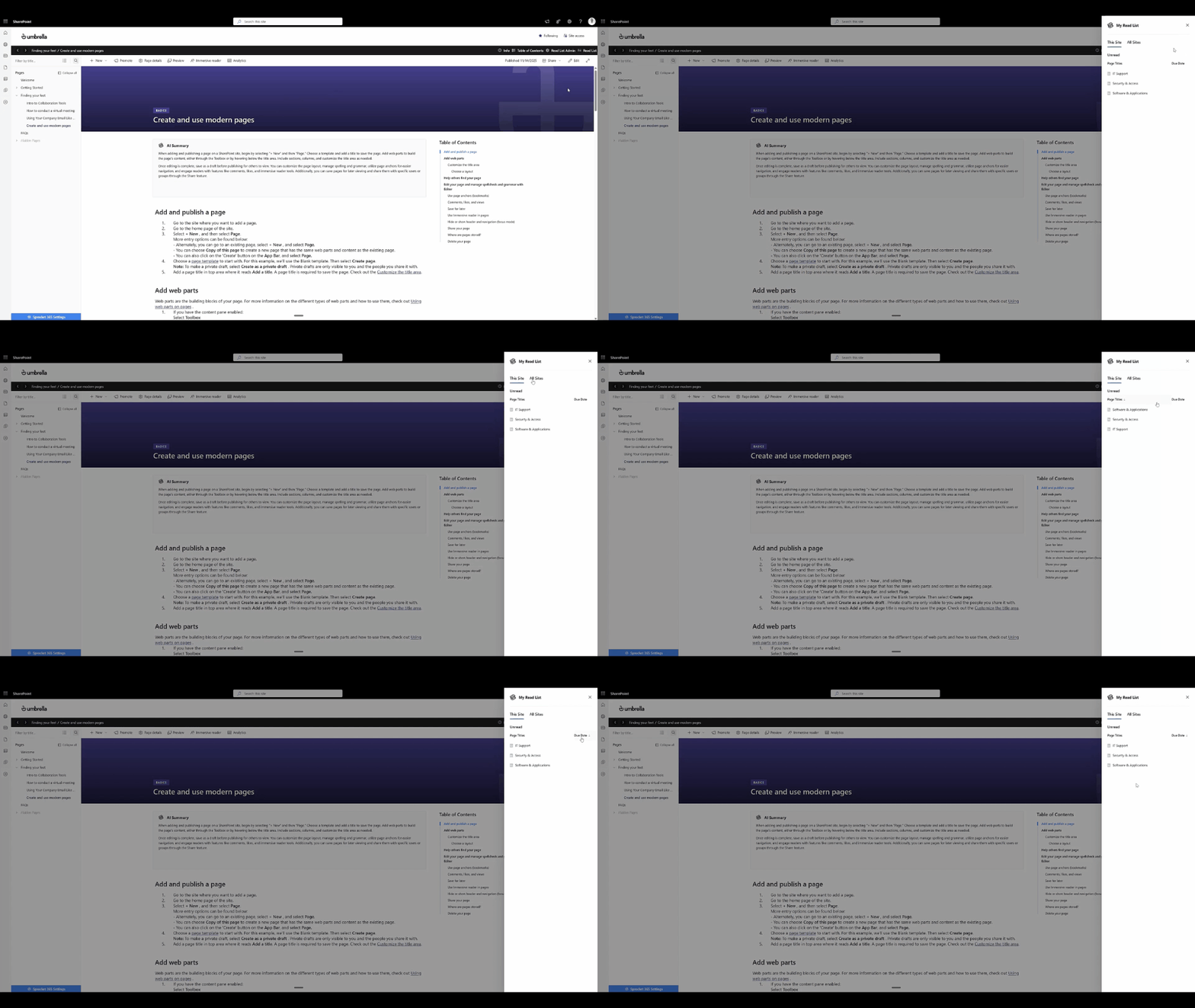
- The Read List view now shows reads from this site and all sites.
- You can now click on title headers to reorder columns.
- The Read List web part on pages includes the same functionality.
New: Custom CSS Per Web Part
For advanced users, Sprocket now allows you to apply custom CSS at the web part level.
- Each web part includes a new setting for adding CSS specific to that instance only.
- You can assign custom CSS classes, which are isolated to individual web parts.
- Great for:
- Styling individual web parts without affecting others.
- Applying a consistent look across selected web parts using reusable class names.
Examples:
- Styling search text boxes with background images and transparency.
- Bolding headings or changing the background of FAQ accordions, without global CSS changes.
Also included: All web parts now include unique CSS classes to make targeted styling easier than ever.

New: Related Pages Web Part
Introducing the Related Pages Web Part (a highly requested feature).
- Add the web part to any page to show links to other related pages.
- A new "Related Pages" column is automatically provisioned in Page Details.
- Select multiple related pages from a lookup of all pages on the site.
- As soon as you publish, they'll appear in the Related Pages section.
Includes multiple layout views. Ideal for onboarding journeys, documentation, and process-driven pages.

New: Onboarding Tour for New Users
To support first-time users, Version 6.7 introduces a brand-new Onboarding Tour, shown when trialling Sprocket and visiting the site for the first time.
Walkthrough includes:
- Adding a web part
- Configuring settings
- Setting up the Knowledge Hub
- Who to contact for support
Once dismissed, it won't reappear, but you can access it anytime via Sprocket Settings.
We think Version 6.7 is one of our most feature-rich updates yet. From intelligent content search and AI-powered summaries to sticky navigation and flexible styling - this release gives users more power, flexibility, and performance than ever before.
As always, we'd love to hear your feedback. Happy Sprocketing!